An Aggregator’s job is to take many bundles and turn them back into one, or, with Group By configured, into a handful of grouped bundles instead of one per record. When the grouping comes out wrong, records that should be together end up split across separate buckets, or records that should be separate get merged into one, and nothing in the run’s status flags it, because the Aggregator did exactly what its configuration told it to do. The bug is very rarely in the Aggregator itself; it is almost always in the value the Group By formula actually evaluated to.
Paste your Make logs and get a free analysis: analyze your logs free.
What the Aggregator does without Group By
Before grouping enters the picture, it helps to be precise about the Aggregator’s baseline behavior. When an Aggregator runs, it accumulates all the bundles it receives during a single source module’s operation and outputs one bundle with an array containing one item per accumulated bundle.
Without Group By, that is the whole story: every bundle that reached the Aggregator lands in the same single output array, in whatever order they arrived (or a configured sort order, if set). Group By changes this by splitting that single array into several, one per distinct value a formula produces.
How Group By actually decides where a record goes
Group By does not sort records by a field’s raw value directly; it sorts them by whatever a formula evaluates to for each incoming bundle. The Aggregator outputs one bundle per each distinct value the formula produces, and each output bundle contains a key (the distinct value) and an array (the aggregated data from every bundle for which the formula evaluated to that key).
This distinction, grouping by a formula’s result rather than a raw field, is exactly where most wrong-grouping problems start: the formula is doing more work than it looks like it is, and two records that a person would call “the same group” can still land in different buckets if the formula produces two different values for them.
Why does a Group By formula that looks consistent produce the wrong groups?
A Group By formula transforms and formats data using Make’s text, math, date/time, and array functions, and a formula that references a text field is vulnerable to any inconsistency in that field’s actual values, inconsistencies that are invisible until you group by them.
Trailing whitespace, inconsistent capitalization, a field that is sometimes null instead of an empty string, or a date formatted two different ways by two different upstream sources, all produce different formula results for records a person would consider the same group. The Aggregator has no way to know these should be treated as one bucket; it only knows the formula’s literal output, so “Acme Corp” and “Acme Corp ” (with a trailing space) become two separate groups with one record each, instead of one group with two.
What happens when the grouping field is null or missing?
When the field a Group By formula depends on is missing or null for a particular bundle, the formula’s result for that bundle is often not what you would predict from the other, healthy records, and the record can end up in a bucket by itself, or merged into an unexpected “empty value” group alongside every other record that also had that field missing regardless of what they actually have in common.
If a downstream count or total looks off by exactly the records that are missing a particular field upstream, this is the pattern to check for first, rather than assuming the Aggregator dropped something.
How do you read the actual bundles at each stage?
The fastest way to confirm a grouping problem, rather than guess at it, is to read the Aggregator’s own input and output bundles for a specific run. Opening a run’s details in the history and checking the output bundles of the module immediately before the Aggregator shows you the raw records and their field values exactly as the Group By formula saw them, before any grouping happened.
Comparing that against the Aggregator’s own output, how many groups came out and what key each one carries, will usually make an inconsistent field jump out immediately: two groups with keys that look almost identical, or a group whose key is blank when you expected a real value.
What do too few or too many groups tell you?
An unexpected group count is a specific, checkable symptom rather than a vague “something is wrong.” Fewer groups than expected means the formula is producing the same value for records you intended to be in different groups, an overly broad formula, or a field with less real variation than assumed.
More groups than expected means the formula is producing different values for records you intended to be in the same group, most often the whitespace, capitalization, or null-handling problems above. Counting the groups the Aggregator actually produced, and comparing that number against how many distinct real-world categories you expected, is a fast sanity check before diving into individual bundle values.
Which checks confirm the cause and the fix?
Work through the same order each time. First, confirm the Aggregator’s actual output group count against how many groups you expected, noting whether it came out higher or lower. Second, read the module immediately upstream’s output bundles for the run in question, focusing on the exact field the Group By formula references.
Third, look specifically for whitespace, capitalization, date-format, or null-versus-empty-string inconsistencies in that field across the records. Fourth, check whether any bundles were missing the grouping field entirely and where they landed. Fifth, once the inconsistent values are identified, decide whether the fix belongs in the Group By formula itself (normalizing the value before grouping) or further upstream, in whatever module produces the field in the first place.
Once a fix is in place, confirm it numerically rather than eyeballing the output and moving on: count the groups the Aggregator produces on a fresh run and compare that number against the count of genuinely distinct real-world categories in the source data, the same sanity check used to catch the problem in the first place, now run in reverse. If the counts still do not match, either the normalization did not cover every inconsistent case, a second field is also feeding into the formula in a way that still produces unwanted splits, or the source data has more genuine variety than assumed. Re-running the same before-and-after count is faster and more reliable than scanning a long list of group keys by eye, especially once the group count climbs into the dozens.
Should you fix it in the formula or upstream?
Once an inconsistency is identified, there are two different places to fix it, and they are not equally durable. Normalizing the value inside the Group By formula itself, trimming whitespace, forcing consistent casing, substituting a default for null, fixes the symptom for this Aggregator specifically, but any other module in the scenario that reads the same raw field still sees the original, inconsistent value.
Fixing the value further upstream, at whichever module first produces or receives that field, fixes it for every module downstream, not just the Aggregator. The formula-level fix is faster to ship and is reasonable for a one-off cleanup; the upstream fix is worth the extra effort when the same field is read by more than this one Aggregator, since a single point of correction is easier to keep correct than the same normalization logic duplicated in several formulas.
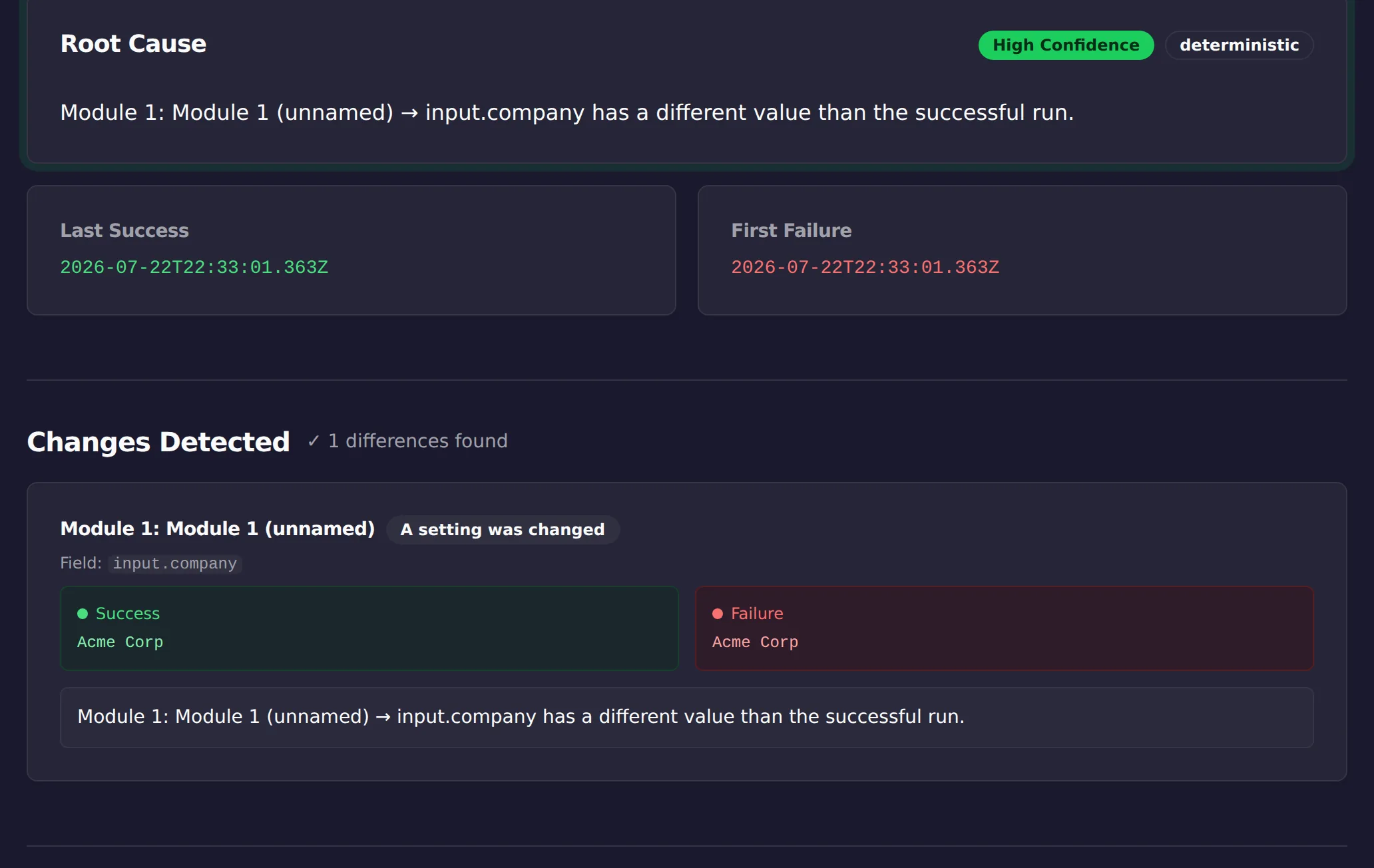
The trailing-space case in the screenshot above was found by ScenarioTrace’s free analyzer, not by eye: it compared a working run against the broken one and flagged the company field whose value gained an invisible character. That is the general trick for Group By problems, stop rereading the formula and diff the actual values the two runs grouped by. The analyzer does that diff in seconds; deciding how to normalize the field is still your call.
Which cause matches what you are seeing?
| What you see | Likely cause | Where to confirm it |
|---|---|---|
| One group where you expected several | The Group By value resolves to the same string for every record | Read the grouping value on each bundle entering the Aggregator |
| More groups than expected | The formula produces small variations you did not intend | Compare the grouping values across bundles for near-duplicates |
| A group you did not define appears | Records with a null or missing grouping field | Check the field on the bundles that landed in that group |
| Groups look right but downstream is wrong | The problem is after the Aggregator, not in Group By | Inspect the bundle the Aggregator output, not its input |
Limitations
This is a manual read of a specific run’s grouping behavior; it explains why records landed where they did on that run, not automatically why an upstream field became inconsistent in the first place. It does not modify the Group By formula or the upstream data for you, and it will not catch a grouping drift that nobody goes looking for.
It is not a substitute for validating or normalizing data at the point it enters your scenario.
This article was drafted with AI assistance and checked against cited sources through ScenarioTrace’s editorial workflow.
Make and Make.com are trademarks of their respective owner. ScenarioTrace is an independent tool and is not affiliated with or endorsed by Make.