A scenario that ran cleanly for weeks and then starts failing is one of the more frustrating shapes a Make.com problem can take, because nothing about the blueprint changed. The instinct is to reread the modules end to end, looking for a mistake that was somehow always there. That search is usually the wrong one. If a scenario worked before and fails now, the blueprint is rarely the problem; the data flowing through it is. The fastest way to find what changed is not to reread the configuration, it is to put a run that worked next to a run that failed and read the two side by side.
Green run but empty output? Analyze your logs free.
Which two runs should you compare?
The comparison only works if you pick runs that are actually adjacent to the change. Open the scenario’s history and find the most recent run that produced the result you expected, then find the earliest run after it that failed or produced a wrong result.
Make’s history records each run’s date and time, its trigger, its status, and its duration, so scanning down the list from most recent to oldest is enough to spot the boundary between working and failing. Resist the urge to grab an old “good” run from weeks back; the closer the working run is to the failing one, the smaller the set of things that could have changed between them, and the faster the comparison narrows down the cause.
What do status and duration tell you first?
Before opening bundle detail, the run list itself gives a first signal. A status of success, warning, or error tells you whether a module actually threw an error, which is different from a run that completed but produced a wrong result.
A scenario that shows warning or error is failing at a specific module, and that module is where the comparison should start. A scenario that shows success but produced output you did not expect is the wrong-output case rather than the broken case, and the comparison needs to focus on values, not on where an error was thrown. Run duration is a smaller but useful signal too: a run that suddenly takes far longer or far less time than its predecessors often means the shape of the incoming data changed, more records, fewer records, or a slower response from a connected service.
How do you compare bundle by bundle?
Open the details for both runs and walk through the same module in each. For every module in the chain, check the output bundles of a specific module from that scenario run, which lets you set the working run’s bundle for a module next to the failing run’s bundle for the same module.
Move through the chain in order, from the trigger forward, and stop at the first module where the two bundles genuinely diverge, not just in value but in shape: a field that is missing where it was present, an array that is empty where it used to have items, a type that changed from a number to a string. That first point of divergence is very often the module actually responsible, even when the error was thrown two or three modules later, because a bad value can pass silently through a module or two before something downstream finally chokes on it.
Where do the two runs usually diverge?
Two spots deserve extra attention when comparing runs, because they can change a scenario’s path without changing anything you configured. A filter on a connection stops the flow when your condition is not met, so if the incoming data now fails a filter it used to pass, downstream modules simply never run for that bundle, no error, just a shorter path.
A router sends each bundle down the chain of modules whose route condition it matches, and if the shape of incoming data shifted, a bundle can start matching a different route than it used to, running modules that were previously never exercised for that kind of record. Both cases look, from the outside, like “the scenario stopped doing what it used to do,” without any module reporting an error, which is exactly why comparing the actual path each run took matters as much as comparing bundle values.
When the two runs took genuinely different paths
Sometimes the comparison shows that the working run and the failing run did not just process different data, they went through different modules entirely, one route fired for the good run and a different route fired for the bad one.
That is a strong signal that a filter or route condition, not a single module’s logic, is where the real change happened. In that case, trace back to the field the filter or route condition reads, and check whether the upstream source of that field changed shape, a renamed key, a different data type, a new possible value it never returned before. The fix in these cases is usually in the condition or the upstream mapping, not in the module that eventually threw the visible error.
Which comparison steps, in which order?
Keep the same order every time so the comparison stays fast under pressure. First, find the most recent working run and the earliest failing run, as close together as the history allows. Second, note each run’s status and duration from the list view before opening details.
Third, walk both runs’ bundles module by module from the trigger forward, watching for the first place a value’s presence, shape, or type diverges. Fourth, check whether a filter or router sent the two runs down different paths rather than the same path with different values. Fifth, once you find the divergence point, confirm whether the cause is a value that changed upstream or a condition that reads it differently than before.
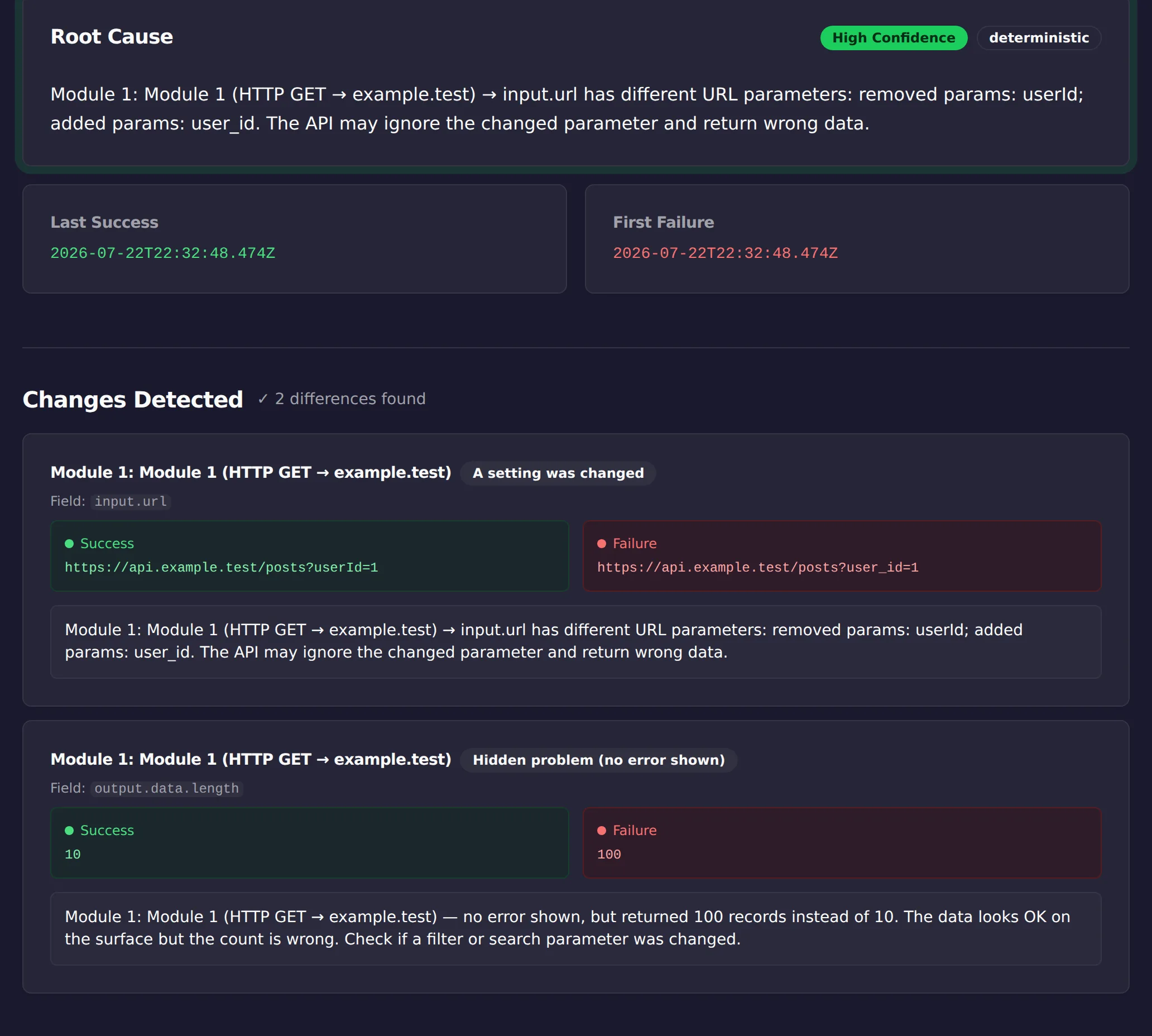
The screenshot near the top of this article is that sequence, run by software instead of by hand: ScenarioTrace’s free analyzer read the same two runs, flagged the renamed URL parameter as the likely cause, and noticed the record count jumping from 10 to 100 with no error anywhere. Pasting both runs takes about a minute; the walk itself takes seconds. What stays with you is the judgment call, whether the divergence it finds is the change you meant to make or the one that broke the run.
Can operations and duration serve as a second signal?
Comparing a single working run against a single failing run finds most cases, but some regressions show up gradually across many runs rather than as one clean before-and-after boundary, a data source that gets slightly larger every day, a response that gets slightly slower every week.
For that pattern, look one level above bundle-by-bundle comparison, at the run list itself. Make’s history records each run’s operations consumed and duration, and scanning several weeks of runs for a slow, steady drift in either number can surface a change that no single before-and-after comparison would catch, because no two adjacent runs look different enough to draw attention on their own. A steadily rising operations count, for the same scenario doing conceptually the same job, usually means the input is growing, more records per run, which is worth confirming before it becomes a rate-limit or cost problem rather than a correctness one.
If your Make plan includes fulltext search across scenario history, that search is worth reaching for once you have a specific value to hunt, an ID, an error string, a field name, rather than for the initial working-versus-failing comparison. Once bundle inspection on a couple of runs has told you which value or field is implicated, searching for that term across the execution history can locate every other run it appeared in, which turns a single incident into a pattern: was this the first time, or has it been happening intermittently for a while under the radar. That distinction changes how urgently the underlying cause needs fixing.
Which signal separates the two runs?
| Signal | Same in both runs | Different between the runs |
|---|---|---|
| Status | The failure is not where the status points; keep reading | Start at the first module whose status differs |
| Duration | Compare bundle contents instead | A long gap points at the module that stalled |
| Bundle count at a module | The divergence is later in the flow | That module is where records were added or dropped |
| Filter or router path | Both runs took the same route | The runs took different paths and the conditions decide why |
Limitations
Comparing two runs is a manual technique that depends on having a working run to compare against; it will not help if the scenario has never produced a correct result, or if the last known-good run is too far in the past to share a useful set of conditions with the failing one.
It surfaces where two runs diverge, not automatically why the underlying data changed upstream, and it does not fix the scenario for you. It is not a substitute for building your own checks on data you rely on for production decisions.
This article was drafted with AI assistance and checked against cited sources through ScenarioTrace’s editorial workflow.
Make and Make.com are trademarks of their respective owner. ScenarioTrace is an independent tool and is not affiliated with or endorsed by Make.