A Make.com connection that suddenly stops working, with every module using it failing at once, tends to get treated as a one-off glitch: reauthorize, move on, forget about it. For a lot of connections that is exactly right. But some connections ask to be reauthorized on a schedule, not because anything actually broke, and treating a structural weekly failure as a random glitch means you keep hitting the same wall without ever finding the setting that would fix it for good.
Paste your logs into the Free Analyzer to check this: analyze your logs free.
What a connection actually is
A connection is the credential bridge between a Make scenario and an outside service. To let a scenario get and send data to a third-party service, you create a connection between Make and that service, and every module in a scenario that touches that service, updating a record, sending a message, reading a sheet, uses that same stored credential rather than asking you to log in each time.
That convenience is also why a single connection failure can look like several separate module failures at once: they are not independent problems, they are one broken credential surfacing in multiple places.
Is time-limited access a bug?
Most modern connections use OAuth, and OAuth was designed around access that expires by default. Apps that use the OAuth 2.0 protocol only grant access for a limited time, which is why you may need to reauthorize your connection periodically.
A connection that asks to be reauthorized every so often is not necessarily malfunctioning; it may simply be behaving exactly as its underlying authorization was designed to. The distinction that matters is between an expected, periodic reauthorization and a connection that keeps failing at a frequency that feels wrong for the service in question.
When reauthorization fails, the causes are specific
A failed reauthorization attempt, not just an expired token but the reauthorize action itself not working, has a short list of concrete causes rather than being a generic glitch. This can happen when a browser blocks the reauthorization popup, the underlying tokens have expired or been revoked, permissions changed on the service’s side, or there was a temporary outage.
Each of these has a different fix: a blocked popup is a browser setting, revoked or changed permissions usually means something changed in the third-party service’s own admin console (not in Make), and a temporary outage just needs a retry once the service is back. Treating all three as the same problem wastes time on the wrong fix.
Why does a connection ask for reauthorization every week?
The most common source of a recurring, short-interval reauthorization requirement is a project-level setting on the connected service, not anything in Make. For Google connections specifically, an OAuth project left in “Testing” status only grants a 7-day authorization period, so a connection tied to that project will require weekly reauthorization until the project is moved to “In production” status.
This single setting explains a large share of “why does this connection keep dying every week” reports: the fix is not to reauthorize more diligently, it is to change the connected service’s own project status, a one-time change that eliminates the recurring failure entirely.
How do you tell a permissions change from an expired token?
Both a permissions change and a plain expired token surface the same way, a module suddenly failing where it used to work, but they call for different responses. An expired token from ordinary time-based expiry is fixed by a straightforward reauthorize: the same access, refreshed.
A permissions change, someone narrowed what the connected account can do, revoked a scope, removed the account’s access to a specific resource, means a plain reauthorize may succeed on the surface while the module still fails, because the credential is valid but no longer has the access the scenario needs. If reauthorizing “succeeds” but the same module keeps failing afterward, the more likely explanation is a permissions or scope change on the service’s side, not the connection’s authentication itself.
When reauthorizing doesn’t fix it
Not every broken connection responds to a straightforward reauthorize. A connection that is broken, expired, or no longer valid can also cause a dependent module to fail at initialization, not just at the point where it is used, and if standard reauthorization attempts do not resolve the failure, the recommended fallback is to delete the old connection and create a new one rather than continuing to retry the same stuck connection.
A connection can end up in a state, particularly after a revoked token or a changed permission set, where the stored credential reference itself is the problem, and no amount of reauthorizing the same broken reference fixes it; starting over with a fresh connection sidesteps whatever state it got stuck in.
What happens when many modules share one connection?
Because a connection is created once and then reused by every module that needs that service, a scenario built for convenience, one connection reused across a dozen modules touching the same account, has a hidden cost: any problem with that single connection takes down every module using it at once, all at the same moment, all for the same underlying reason.
This is usually the right tradeoff, since maintaining a separate connection per module for no reason adds overhead without adding safety, and a burst of simultaneous module failures across a scenario is a strong signal to check the shared connection first, rather than investigating each failed module as if it were an independent problem.
That said, a shared connection does not guarantee a shared symptom, so it is worth confirming which modules actually failed and why before assuming they all failed the same way. Opening a run’s details shows the input and output for each module in that run, which distinguishes a module that failed on an authentication error (a genuinely dead connection) from a module that failed on something else entirely (a permissions gap, a rate limit, a data problem) despite using the same connection. Confirming the actual error message per module, not just “it failed,” is what tells you whether reauthorizing will even address the problem you have.
Which checks isolate a failing connection?
Work through the same sequence. First, read the specific error each affected module reported, rather than assuming they all failed for the same reason. Second, attempt the standard reauthorize and note whether it succeeds cleanly or the popup itself fails, since a blocked popup is a browser issue, not a Make or service issue.
Third, if the connection requires reauthorization on a suspiciously short, recurring interval, check the connected service’s own project or app status for anything resembling a “testing” or time-limited mode. Fourth, if a module keeps failing even after a clean reauthorize, check for a permissions or scope change on the service’s side rather than re-attempting the same reauthorize. Fifth, if nothing above resolves it, delete and recreate the connection rather than continuing to retry a connection that may be stuck in a bad state.
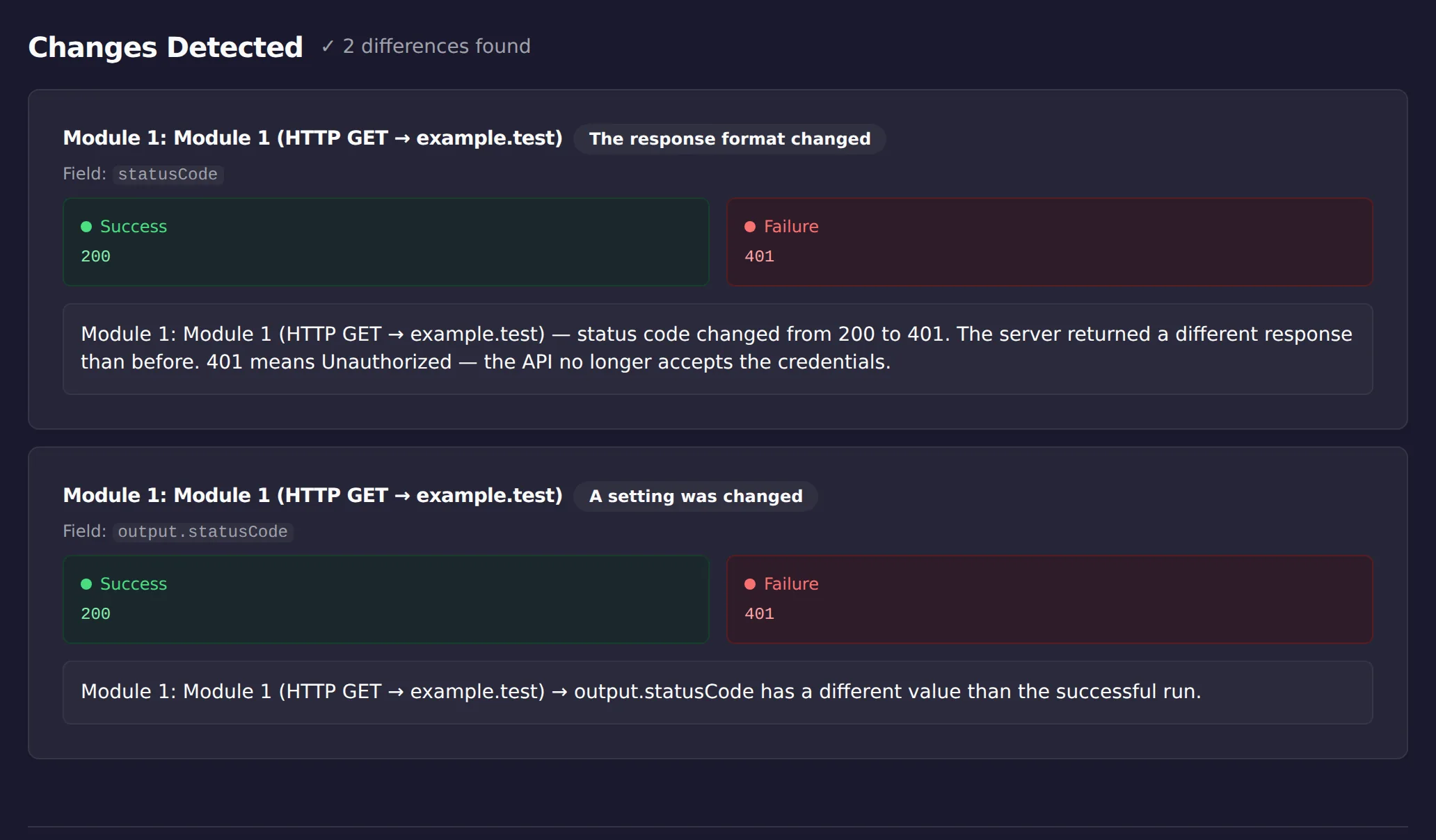
Reauthorization failures announce themselves clearly in one place: the status code. In the screenshot above, ScenarioTrace’s free analyzer compared a working run against a failing one and surfaced the change from 200 to 401 immediately, which is usually all the diagnosis this problem needs. If your scenario’s symptom is vaguer than a clean error, pasting the two runs is a quick way to confirm whether you are looking at an auth problem or something else wearing its clothes.
Which connection problem do you have?
| Symptom | What it usually means | Next check |
|---|---|---|
| Prompted once after a long gap | Time-limited access expired normally | Reauthorize and confirm the scenario resumes |
| Prompted every week | A configuration state, not a one-off expiry | Compare against a connection that does not re-prompt |
| Reauthorizing does not fix it | Permissions changed on the provider side | Check what scopes the account still grants |
| Several modules fail together | One shared connection behind all of them | Confirm whether the modules use the same connection |
Limitations
This is a manual diagnostic sequence for a connection that has already started failing; it does not monitor connection health continuously or warn you before a token expires. It does not change your connection’s settings, the connected service’s project status, or its permissions for you. It does not cover every third-party service’s specific authentication quirks, only the general OAuth expiration and reauthorization pattern documented for Make connections broadly.
This article was drafted with AI assistance and checked against cited sources through ScenarioTrace’s editorial workflow.
Make and Make.com are trademarks of their respective owner. ScenarioTrace is an independent tool and is not affiliated with or endorsed by Make.