A Make.com scenario that quietly stops processing some of its records is one of the harder problems to notice, because nothing about it looks broken. The scenario still runs on schedule, it still shows a status, and most bundles still go through. What is missing is easy to miss too: a handful of records that should have been processed simply were not, and no error was thrown, because a filter or a router condition did exactly what it was configured to do. Understanding how filters and routers can silently block a bundle, and where to look when they do, is the difference between catching this in minutes and discovering it weeks later when someone asks why a record never showed up downstream.
Green run but empty output? Analyze your logs free.
Is a filter stopping a bundle an error?
A filter attached to a connection between two modules exists to control what passes through, and it does its job correctly by definition every time it blocks something. Make’s own documentation describes this plainly: a filter stops the flow when your condition is not met.
That is not a failure state. From the scenario’s point of view, a bundle that fails a filter simply does not continue down that connection, and nothing downstream ever sees it, so nothing downstream can report that it is missing. The scenario’s overall run can still finish as Success, because every module that did execute completed cleanly; the module that never ran because its input was filtered out has nothing to report. This is the core reason filters cause silent gaps rather than visible errors.
Why a filter that used to pass everything can start blocking
A filter’s condition is usually written against an assumption about the shape or range of the incoming data at the time it was configured: a status field that is always one of three values, a date that is always populated, a country code that is always two letters.
When the upstream source changes, a new status value gets introduced, a field starts arriving blank in some records, an integration starts sending a longer country name instead of a code, the filter’s condition is still doing exactly what it was told, but the assumption behind it no longer holds for every record. The records that no longer match do not throw an error; they simply stop being included, and the filter itself gives no indication that fewer records are passing today than were passing last month.
How do routers add a second failure mode?
A router works differently from a filter but can produce the same kind of silent gap. A router branches the flow into several chains of modules, and each route processes data differently according to the condition you set, with routes evaluated in the order they are arranged.
If a bundle’s data shifts in a way that changes which route’s condition it now matches, it can start running down a route that was built for a different case entirely, executing without error but doing something the scenario was never meant to do for that kind of record. Conversely, if a router has no explicitly configured fallback route and every specific route’s condition fails to match, the bundle can be dropped at the router with the same silent, no-error outcome as a blocked filter. A fallback route, when configured, exists specifically to process data that doesn’t fit the condition of all other routes, so a router without one is a router with no safety net for data it was not anticipated to see.
Where to look when records seem to be missing
The starting question is not “did the scenario fail,” it is “did every record I expected to see make it through.” Compare the number of records you expected against the number that actually reached the final destination for a given run; a gap there, with no corresponding error, points straight at a filter or router rather than a module failure.
From there, open the run’s history and check the output bundles of a specific module from that scenario run at the module immediately before the filter or router in question. If a bundle you know should have been processed is present at that module’s output but never appears at the next module’s input, the connection between them, the filter or the route condition, is where it was dropped.
How do you tell an intentional block from an unintended one?
Not every blocked bundle is a bug; filters and route conditions exist precisely to exclude records that should not be processed, and a scenario working as designed will legitimately drop plenty of bundles every run.
The distinction is whether the record you are looking at was ever meant to be excluded. A test record with an obviously invalid field being filtered out is the filter doing its job. A real customer record being filtered out because a field it always used to have now arrives empty is the filter doing its job on data it was never designed to see. Reviewing the filter’s condition against a handful of the records that got blocked, not just the ones that passed, is usually enough to tell the two apart.
Which recurring check catches silent blocking?
Because a silent block leaves no trace in the run’s status, it will not surface on its own; someone has to notice the downstream gap and trace it back. Building a habit of periodically comparing an upstream record count against a downstream one, even a rough manual count once a week, is a cheap way to catch a drifting filter condition before it has silently excluded weeks of records.
When a gap does appear, the fastest path is always the same: find a specific missing record, locate the run and module where it should have continued, and read that module’s output bundle against the next module’s input to see exactly where it stopped.
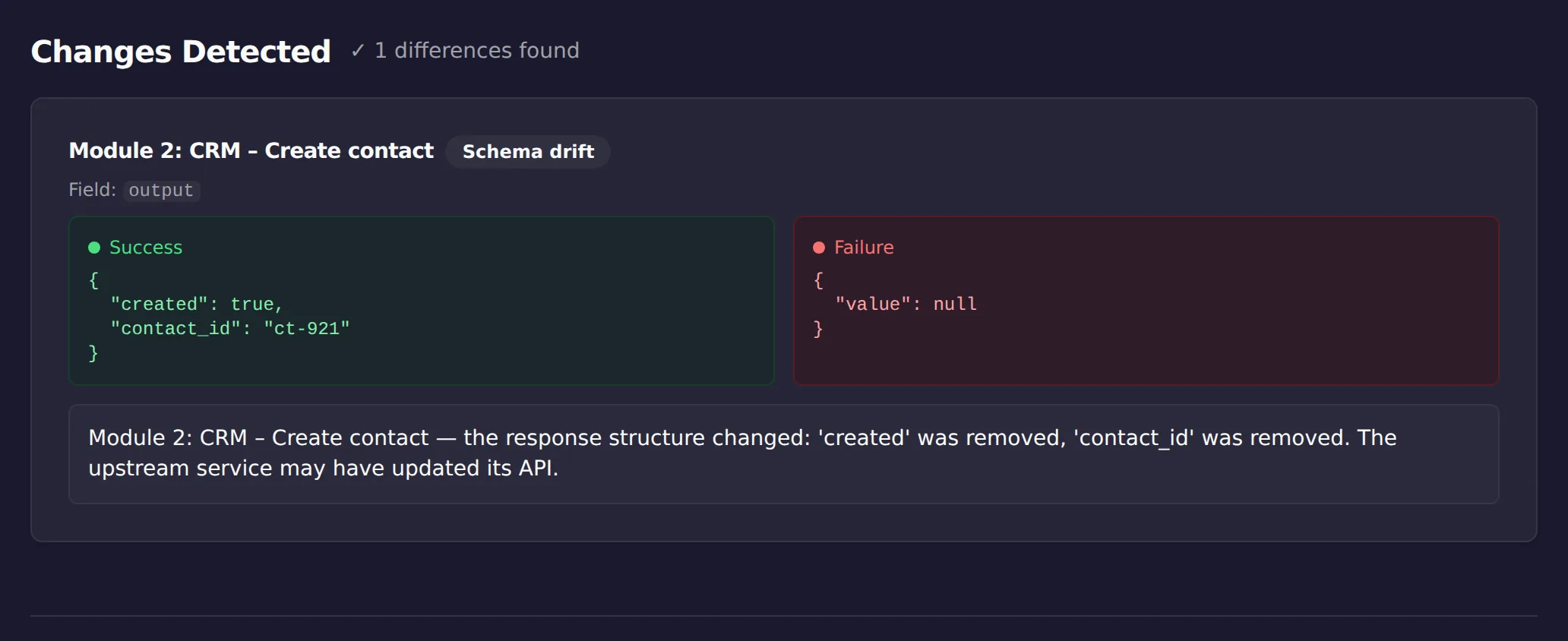
There is also a faster way to see a blocked chain than eyeballing route paths: paste a run where records flowed and a run where they vanished into ScenarioTrace’s free analyzer, and the missing output shows up as a finding, like the screenshot above, where the module after the filter simply produced nothing. The analyzer can tell you the chain went quiet and where; whether the filter’s condition is wrong or the data changed upstream is the part that still needs your eyes.
Where do filter operators and combined conditions drift?
A single filter is rarely just one comparison. Make’s filters support a range of operators, comparisons like equals and contains alongside numeric ones like greater than, and multiple conditions can be combined into one filter to build a more complex rule.
Every additional condition in a combined filter is another place a silent gap can open: a record that used to satisfy all of them can start failing just one, and the whole filter still blocks it, with no indication of which specific condition was the one that stopped matching. When troubleshooting a combined filter, it is worth testing each condition against the record in isolation rather than assuming the whole filter is simply “wrong,” since the fix is often narrower than it first appears, one clause that needs updating, not the filter’s overall logic.
Does route order matter as much as route conditions?
Routes on a router are not evaluated all at once; Make processes them in the order they are arranged, and reordering routes is itself a way a scenario’s behavior can shift without any condition being edited.
If two routes’ conditions could both match the same bundle, whichever route comes first in the arrangement is the one that actually runs for it, and if someone reorders the routes, for readability, to add a new route in between, or for any other reason, a bundle that used to take one path can start taking a different one even though every individual condition is untouched. This is a quieter cousin of the drifting-condition problem: the conditions did not change, but which one gets checked first did, and the practical effect on a bundle whose data satisfies more than one route is identical to a condition change from the outside.
Is the block intentional or not?
| Observation | Intentional block | Unintended block |
|---|---|---|
| Records stop at a filter | The condition is doing its job | The incoming data changed shape or type |
| Only some records pass | The filter is selective by design | An operator matches more or less than you assumed |
| A router branch never fires | That branch is for a case that has not occurred | Route order or conditions send everything elsewhere first |
| No error appears anywhere | Expected: a filter stopping a bundle is not an error | Also expected, which is why this needs a deliberate check |
Limitations
This is a manual diagnostic approach: it depends on someone noticing a downstream gap and being willing to trace a specific record back through the run history, and it does not automatically flag a drifting filter or route condition on its own.
It will not catch every silent-block pattern, particularly gradual drift where only a small fraction of records are affected on any given run. It does not change or fix a filter’s or router’s condition for you; that decision, and the tradeoff of what a condition should and should not exclude, stays with whoever owns the scenario.
This article was drafted with AI assistance and checked against cited sources through ScenarioTrace’s editorial workflow.
Make and Make.com are trademarks of their respective owner. ScenarioTrace is an independent tool and is not affiliated with or endorsed by Make.