An Iterator in a Make.com scenario has one job: take an array and turn it into a series of individual bundles, one per item, so every module after it can process each item on its own. When the number of bundles an Iterator produces shifts, more items than expected, fewer than expected, or occasionally zero, the instinct is to suspect the Iterator module itself is misbehaving. In practice the Iterator is almost never where the problem starts. It faithfully converts whatever array it receives, so a bundle-count change nearly always means the array it received was not the array you expected, and the real question is what changed upstream of the Iterator, not inside it.
Paste your logs into the Free Analyzer to check this: analyze your logs free.
What an Iterator actually does
Make’s documentation is direct about the Iterator’s role: it converts an array into a series of bundles, and each array item will output as a separate bundle. Downstream modules then run once for every bundle the Iterator emits, in order, so ten items in the array means ten runs of every module that follows the Iterator in that branch. The Iterator has no logic of its own about which items belong in the array or how many there should be; it consumes whatever array it is given and splits it, item for item. That single-purpose design is exactly why an Iterator is a poor place to start debugging a bundle-count problem: there is very little for it to get wrong on its own.
The array feeding it is where counts actually change
If an Iterator produces more bundles than before, the array it received grew: a search or list module upstream returned more records, a paginated request now returns additional pages, or a field that used to hold one item now holds several. If it produces fewer bundles, the array shrank: fewer records matched a search, a filter earlier in the chain excluded more items than usual, or an upstream module’s output changed shape and now returns a smaller or emptier array. If the Iterator produces zero bundles, and nothing downstream runs at all, the value mapped into its Array field was empty, not an array, or missing entirely for that run. In every one of these cases, the fix is upstream of the Iterator, in the module or the field that produces the array, not in the Iterator’s own configuration.
Confirm what the Iterator actually received
Guessing which of these happened wastes time; reading the run tells you directly. Open the specific run in the scenario’s history and check the output bundles of a specific module from that scenario run for the module immediately before the Iterator, the one whose output is mapped into the Iterator’s Array field. The size and contents of that array, for that specific run, is the ground truth: if it has twelve items where it used to have eight, the bundle-count increase is fully explained before you even look at the Iterator’s own output. If the mapped value is not an array at all, an object, a single string, or nothing, the Iterator will not be able to produce bundles correctly from it, which is the zero-bundle case.
When an upstream HTTP response changes shape
A common source of a shifting array is an HTTP module earlier in the scenario. If a connected API changes how it paginates results, nests a list one level deeper than before, or renames the field that holds the array of records, the response Make receives and can map into the Iterator changes even though nothing in your scenario’s configuration changed. The Iterator keeps working exactly as designed on whatever it is handed; it is the upstream response shape that shifted underneath the mapping. This is worth checking specifically when a bundle-count change coincides with no changes on your end, since an external API update is a common trigger that has nothing to do with the scenario itself.
Aggregators hide the same problem from the other direction
An Iterator and an Aggregator are often paired, the Iterator splitting one bundle into many, an Aggregator later collecting them back into one. A bundle-count change at the Iterator will show up as a changed number of items collected by the Aggregator downstream, which is sometimes where the symptom is actually noticed, a report with too many or too few line items, rather than at the Iterator itself. If you are debugging from a downstream symptom like this, trace back through the Aggregator to the Iterator that fed it, and from there to the array that fed the Iterator, using the same run’s bundle history at each step.
A checklist for an unexpected bundle count
Work through the chain in the same order each time. First, confirm the actual bundle count for the run in question by counting the Iterator’s own output bundles in the run’s history, rather than assuming from the final result. Second, open the module immediately before the Iterator and read the exact array it produced for that run. Third, compare that array’s size and contents against what you expected, and note whether it grew, shrank, or was not an array at all. Fourth, if the feeding module is itself downstream of an HTTP request, check whether the response shape could have changed on the API side. Fifth, once the array’s size is explained, decide whether the change is legitimate, more real records this run, or a symptom worth fixing upstream, a filter that is now too loose or too strict, a mapping pointed at the wrong field.
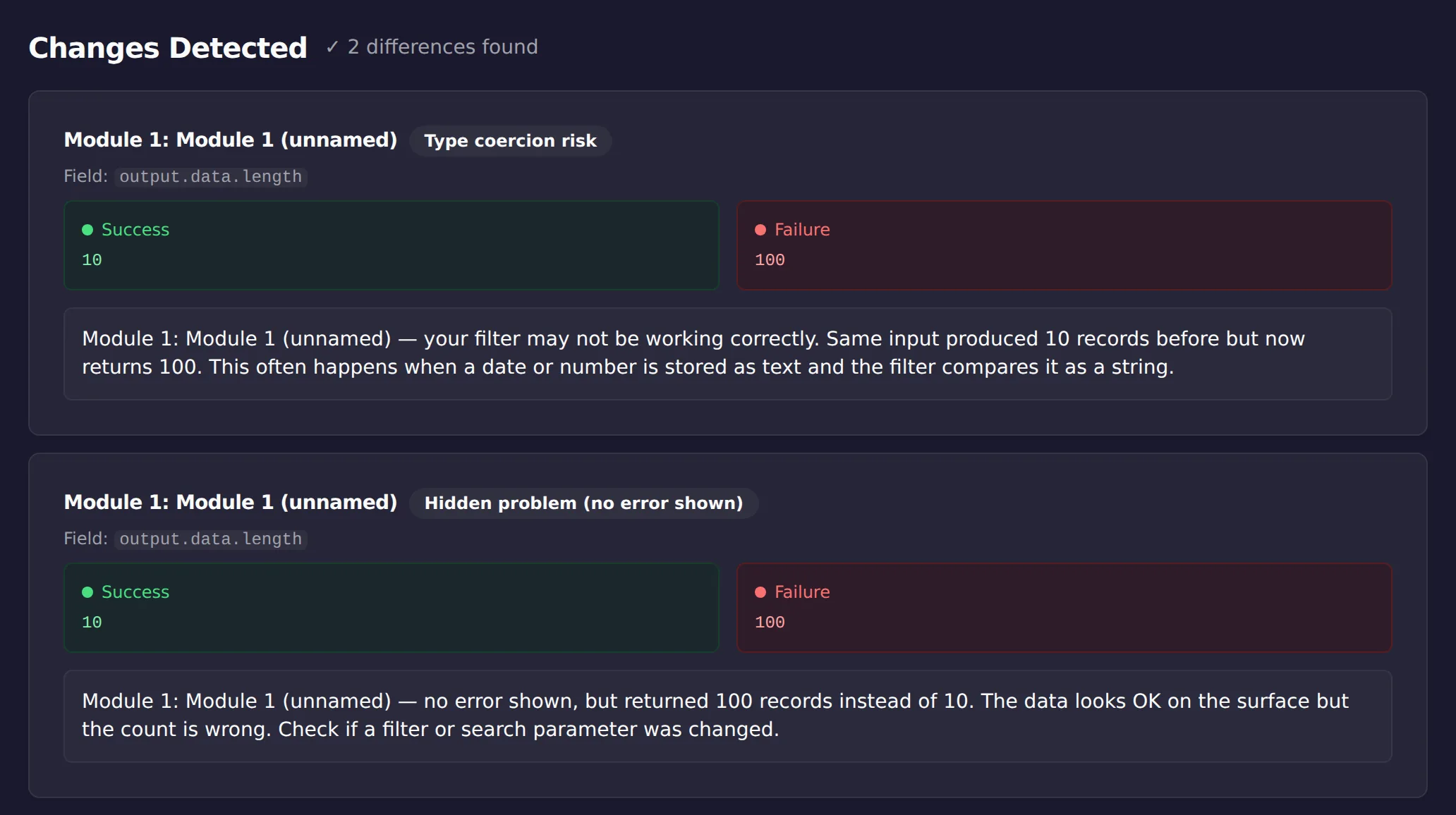
A count change is the easiest divergence to miss by eye and the easiest one for a machine to catch. That is what the screenshot above shows: ScenarioTrace’s free analyzer comparing the same Iterator across two runs and flagging the array that grew from 10 items to 100 with no error raised. Run your own pair of runs through it before you start rereading mappings; if the count changed upstream, you will know in seconds, and if it did not, you have ruled out the most common cause just as fast.
App-specific iterators follow the same rule as the general one
Some Make apps ship their own pre-built iterator modules alongside connections to that app, an email app’s “iterate attachments” module, for instance. These are not a different mechanism: an app’s own iterator produces the same result as the general Iterator, without you having to specify the array yourself, because the app has simply pointed the same array-to-bundle conversion at a field it already knows the shape of. That matters for troubleshooting because a bundle-count problem on an app-specific iterator has the identical cause as one on a general Iterator: something about the array it is drawing from changed size or shape, an app version update, an account with more items than before, a filter earlier in the chain. The fact that the module has a friendlier, app-specific name does not change where to look.
A nested array can look like the wrong array entirely
One specific way an Iterator’s Array field ends up mapped to something unexpected is nesting: an API response or a prior module’s output can hold the array you want several levels deep inside an object, rather than as a direct top-level value, and mapping to the wrong level produces bundle counts that look inexplicable until you notice a level was skipped. Mapping one level too high hands the Iterator a single object instead of an array, the zero-bundle case; mapping to a sibling field that happens to also be an array-shaped value can produce a plausible-looking but entirely wrong count. Reading the exact structure of the module immediately upstream, not just its size, is what catches this: the fix is usually just pointing the Array field at the correct nested path, once the actual shape is visible in the run’s bundle data rather than assumed from memory of how the response used to look.
Limitations
This is a manual read of a specific run’s bundle data; it explains what array the Iterator received on that run, not automatically why an upstream source changed or whether the new count is correct for your use case. It does not modify the Iterator’s configuration or the upstream module for you, and it will not catch a bundle-count change that never gets reviewed. It works best as a technique applied to a run you already suspect produced the wrong count, not as a standing monitor.
This article was drafted with AI assistance and checked against cited sources through ScenarioTrace’s editorial workflow.
Make and Make.com are trademarks of their respective owner. ScenarioTrace is an independent tool and is not affiliated with or endorsed by Make.