A Make.com scenario finishing with a green Success status tells you every module ran without throwing an error. It does not tell you the data that came out the other end was correct. A spreadsheet row can land with the wrong value in the wrong column, a CRM record can update with a stale field, or a Slack message can go out with an empty variable, and the run still shows Success, because nothing about a wrong value stops a module from completing. Chasing this kind of bug by rereading the scenario blueprint rarely works, because the blueprint shows what the scenario is supposed to do, not what it actually did on the run that produced the bad result. The fix is to stop reasoning from the blueprint and start reading the one run that went wrong.
Check whether this is a silent-failure pattern — analyze your logs free.
Why “Success” does not mean “correct”
A module in Make.com reports success when it completes its own operation: an HTTP request that gets any response, a spreadsheet write that Google Sheets accepts, a lookup that returns no rows. None of those things are wrong from the module’s point of view, even when the value it passed along was empty, stale, or mapped from the wrong field.
The scenario’s overall status only reflects whether every module in the executed path completed without an error being thrown, so a scenario can be internally consistent and still be wrong, if an earlier module handed later modules a value that was technically present but not the value you meant to use. That gap between “ran without error” and “produced the right result” is the reason a wrong output so often gets discovered by a person days later, not by the scenario itself.
Should you start from the run or the blueprint?
The editor view of a scenario shows the current configuration, the fields, the mappings, the connected modules, but it does not show what any particular run actually received or sent. To see that, you need the scenario’s history.
Make.com’s execution history records, for each run, the run date and time, the trigger or activity type, the status, the run duration, and the operations consumed, and it keeps the bundle-level detail behind each of those runs, not just the summary line. That per-run record is the only place that shows you the exact data a module worked with on the run you care about, as opposed to what it would produce today if you ran it again with different upstream data.
How do you inspect each module’s bundle?
From the scenario’s history tab, open the specific run that produced the wrong result and select its details. Inside that view you can check the output bundles of a specific module from that scenario run, which means you can walk the chain of modules in order and see the exact input a module received and the exact output it produced, for that run, not a hypothetical one.
This is the single habit that turns “the result is wrong somewhere in there” into “module four received the wrong customer ID, and module three is the one that mapped it incorrectly.” Work from the end of the chain backward: look at the final module’s input first, since that is closest to the bad output you already see, then step back one module at a time until the value stops being wrong. The module where a value flips from correct to incorrect is the one to fix.
Why read the input and not just the output?
It is tempting to look only at what a module produced, since that is what feeds the next step. But a module that receives bad input and passes it straight through will show a perfectly consistent output, wrong data going in, the same wrong data going out, and nothing about that module’s own logic is broken.
Reading the input side of each bundle is what tells you whether a module is the source of the error or just a carrier of an error that started upstream. This distinction matters most in scenarios with several transformation or lookup steps in a row, where the actual mistake, a wrong field mapped one module earlier, is easy to miss if you only skim outputs on the way down the chain.
Where does a successful run commonly go wrong?
A handful of patterns cover most cases where a scenario finishes green but the result is off. A field mapped to the wrong source variable produces a value that looks plausible but is not what you meant, and nothing errors because both variables exist.
A lookup that finds no match returns an empty value instead of throwing, and if nothing downstream checks for empty, an empty field quietly reaches the destination. An HTTP module response that changes shape upstream, a field renamed or nested differently by the remote API, still gets accepted and mapped by Make, just to the wrong place if the mapping was pinned to the old shape. And a router with more than one matching route, or a route whose filter condition is looser than intended, can send a bundle down a path that runs without error but was never meant to fire for that data. None of these throw a module error, which is exactly why the history, not the error log, is where you find them.
Which checks catch a wrong-but-successful run?
Run through the same sequence each time a Success run produces a wrong result, so the check stays fast and does not depend on remembering where the bug was last time. First, open the specific run in history, not a fresh test run, since a fresh run may pull different upstream data and hide the original condition.
Second, start from the last module and read its input bundle against the bad output you already see. Third, step back one module at a time, comparing each module’s output to the next module’s input, until you find the module where a value stops matching what you expected. Fourth, once you find that module, check whether the problem is its own mapping or a value it inherited from further upstream. Fifth, note whether the condition is likely to recur, a specific record shape, a specific route, a specific missing field, so you know whether this was a one-off or a pattern worth building a check for.
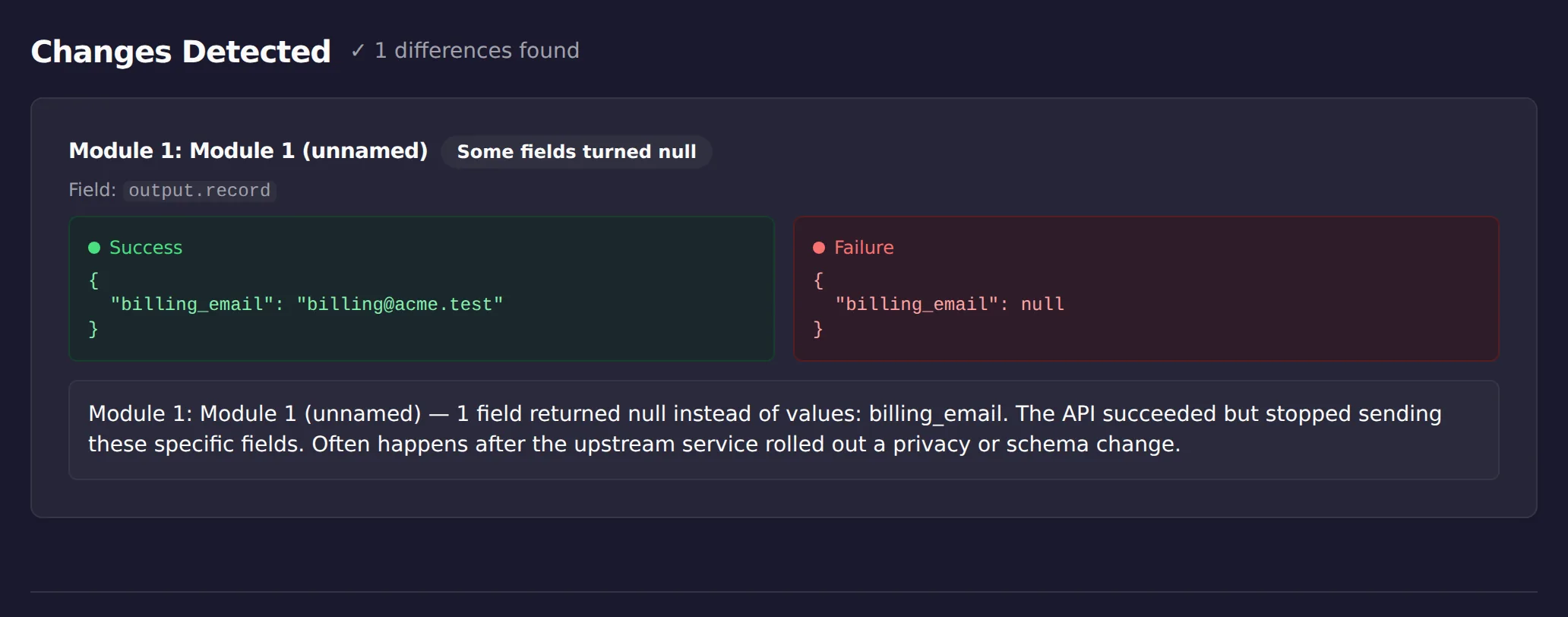
If walking a chain module by module sounds like the part you will skip under deadline, that is the part ScenarioTrace’s free analyzer does on its own. In the screenshot above it caught the exact case this article describes, a green run whose billing_email came back null, by comparing a good run’s output against the bad one. It will not fix the mapping, and it will not know which value you intended; it will show you where the two runs stopped agreeing.
Where does a successful run go wrong?
| Where | What it looks like | What to inspect |
|---|---|---|
| A mapping | The right module ran with the wrong field | The module’s input bundle, not its output |
| A filter | Fewer records than expected continued | Bundle counts on either side of the filter |
| An iterator or aggregator | The item count changed unexpectedly | The array entering and the bundles leaving |
| An upstream response | The data was already wrong on arrival | The first module that received external data |
Limitations
Reading a run’s bundle history tells you what happened on one execution; it does not automatically explain why, and it does not fix the mapping or the upstream module for you. This is a manual diagnostic technique, not an automated monitor: it depends on you opening the run and reading the bundles, and it works best when you already suspect which run produced the bad result.
It will not catch every possible wrong-output pattern, and it does not replace testing a scenario’s logic against a range of inputs before relying on it for production data.
This article was drafted with AI assistance and checked against cited sources through ScenarioTrace’s editorial workflow.
Make and Make.com are trademarks of their respective owner. ScenarioTrace is an independent tool and is not affiliated with or endorsed by Make.